Singapore Red
HEXRGBCMYK
#F4333D244 / 51 / 610 / 79 / 75 / 4
SGDS colours are designed to be clear, accessible and communicate how things function in the interface. This helps to create visual patterns that can make interacting easier and more predictable.
Our colour system starts with three primary GovTech colours, which form the foundation of our visual identity. These core colours extend into ten colour families, providing flexibility for applications such as data visualisation, illustration and other expressive uses while maintaining harmony with our brand foundation.
SGDS’s greys follow a perceptually curved progression of lightness. The outcome is a progression of grey colour values that are optimal for SGDS’s usage of grey. Each lightness value was converted into a target contrast ratio, which follows a polynomial curve.
As colours increase in saturation, they appear to have a brighter luminosity (also known as the Helmholtz–Kohlrausch effect). This affects SGDS colours that differ in saturation levels.
Semantic colours should be reserved for meaning. Use them consistently for success, warning, danger, and information so users can recognise state and feedback quickly.
Colour roles help the same colour system behave consistently across backgrounds, surfaces, text, and icons. Instead of choosing colours ad hoc, apply the matching SGDS role token for the job.
Default (pure white) serves as the primary background for most pages and sections. It provides a clean, high-contrast surface for content-heavy layouts such as dashboards and forms.
Alternate (off-white) adds subtle contrast from the default background to help separate sections without needing strong dividers.
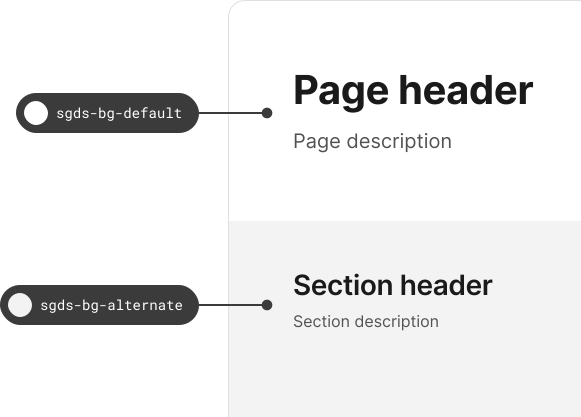
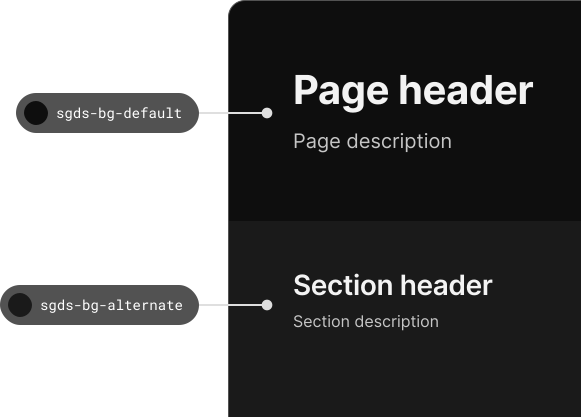
Surface default is used for containers such as cards, drawers, dialogs, and modals that need a distinct layer from the page background.
Surface raised is used for components that need more emphasis, such as popovers, tooltips, or floating panels, where extra depth helps focus attention.
Default should be used for primary text and icons on light surfaces so the most important information stays clear and readable.
Subtle works for supporting text and secondary icons where hierarchy matters, but readability still needs to be maintained.
Use background colour to support hierarchy and focus, not to compete with content. Strong colour works best when it is deliberate, limited, and paired with enough neutral space around it.
Keep most page surfaces neutral so content, actions, and status colours remain easy to spot.
Do not use strong brand or accent colour across large background areas when readability is the main task.
Use stronger colour on key actions, active states, or important highlights rather than across the whole interface.
Too many competing colours weaken visual hierarchy and make interfaces feel noisy and inconsistent.
Text colour should prioritise legibility first. Use semantic text colours and accessible contrast pairings, and avoid relying on decorative colour to carry meaning on its own.
Choose text and background combinations that remain readable across themes, states, and surface levels.
Do not use vivid brand or semantic colours for long-form body text when a neutral text token would read more clearly.
Use icons, labels, or weight changes alongside colour so links, emphasis, and state changes are still understandable.
If colour is the only signal, users can miss meaning in low-contrast conditions or with colour-vision differences.
Semantic colours should communicate a stable meaning across products. Use them consistently for states such as success, warning, danger, and informational feedback rather than as general decoration.
Use the same semantic meaning for success, warning, danger, and information wherever those states appear.
Do not use warning colour for confirmation or success colour for neutral emphasis, even if it looks visually pleasing.
Apply semantic colour through the right text, border, and surface tokens together so states remain clear and accessible.
Do not use semantic colours as ornament when no real status, feedback, or meaning needs to be conveyed.
The Singapore Government Design System was developed to empower teams in creating fast, accessible and mobile-friendly digital services.